Showing posts with label Enterprise Software. Show all posts

Wednesday, June 24, 2009

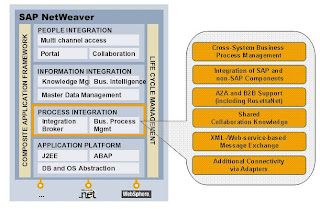
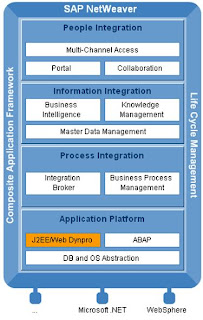
SAP Netweaver Capabilities

SAP Jave AS supports J2EE standard, version 1.3 and 1.4


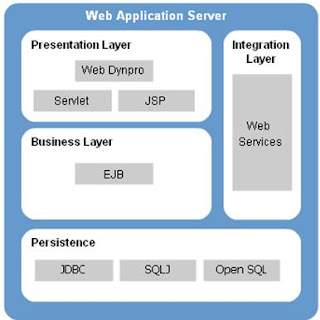
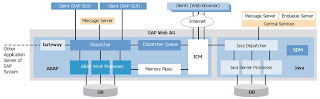
SAP Web Application Server


ABAP WorkBench
- ABAP Editor
- ABAP Dictionary
- Screen Painter
- Menu Painter
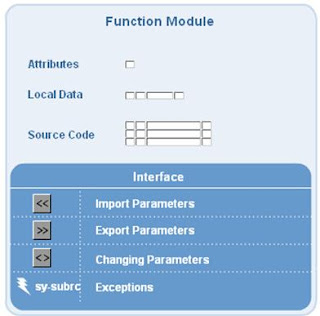
- Function Builder
- Class Builder

ABAP Categories
- Screens (With ABAP Dictionary integrated inthe system, automatic consistency checks for screen input fields (type, foreign key, fixed value checks).
- Lists (display data using minimum programming effort)
- Classes (similar to a function group but multiple instances. contains data objects (attributes) and functions (methods))
- Function modules (actively integrated modularization units with an interface. They can be called primarily from within programs or other function modules. elements are: import paramenters, Export parameters, Changing parameters, Exceptions)


Features of SAP Web AS Platform
- Server-based and Client-based Web Applications
- ABAP
- Java
- Business Communication Services
- Connectivity
- Database and Operating Systems
- SAP Knowledghe Warehouse

SAP Exchange Infrastructure (XI)


SAP Integration Builder
- Central development environment for the development of all design objects for theintegration Repository at design time.
- Defines all configuration objects for the integration Directory at configuration time


Prerequisites to Design


Business Process Components


Business processes are initially designed in the Integration Builder and only utilize abstract messages. The processes are finalized and configured in the Integration Directory. At the execution time, the processes are executed within the Business Process Engine (BPE)

Cross-Component Business Process Management
- Provides integrated capability to design, model, and execute complex distributed interfacing scenarios involving homogenous and heterogeneous systems


Components of BW
- Enterprise-wide data warehousing
- Business intelligence platform
- Business Intelligence Tools

Technical Components of SAP NetWeaver Master Data Management
- SAP EP
- SAP MDME Console
- SAP MDME Client
- SAP MDME Importy Manager
- SAP MDME Syndicator
- SAP Exchange Infrastructure
- SAP Business Warehouse

Architecture of SAP NetWeaver MDM


Master Data Management

Core Components of SAP NW MDM
- Master-data consolidation
- Master-data harmonization
- Central master-data management
Developing Portal Content
-SAP EP Portal Content Studio
- SAP NetWeaver Visual iComposer
- SAP NetWeaver Developer Studio (Web Dynpro)
- SAP NetWaver Developer Studio (Java + PDK Perspective)

Thursday, June 11, 2009

SOA Principles

Design Fundamentals
- Design Characteristic (Te-Zhen)
- Design Principle (Yuan-Zhe)
- Design Paradigm (Si-Lu)
- Design Pattern (Mo-Shi)
- Design Pattern Language (Mo-Shi-Yu-Yan)
- Design Standard (Bia0-Zhun)
- Best Practice (Jin-Yan-Zhong-Jie)

Fundamental Design Framework
Design Principles Centered


Design Patterns Centered

Service-Oriented Computing
- Service-Oriented Architecture
- Service-Oriented Design Paradigm
- Service-Oriented Solution Logic
- Service Compositions
- Services
- Service Inventory

Web Service Architecture
- Service Contract
- Core Service Logic (Business Logic)
- Message Processing Logic


Service -Oriented as a Design Paradigm
- Standardized Service Contract
- Service Loose Coupling
- Service Abstraction
- Service Reusability
- Service Autonomy
- Service Statelessness
- Service Discoverability
- Service Composability

Design Principles


Principles and Design Granularity
- Service Granularity
- Capability Granularity
- Data Granularity
- Constraint Granularity

Impacts of Standardized Service Contract
- Service Loose Cupling (affects the quality of attainable)
- Service Abstractio (affects the extent of attainable)
- Service Reusability (establishes conventions that affect the potential of attainable)
- Service Discoverability (Introduces contract design conventions that can enhance or constrain)
- Service Composability (may introduce contract content requirements that support)

Service Contract Coupling Types
- Logic-to-Contract Coupling (contract drives logic)
- Contract-to-Logic Coupling (logic drives contract)
- Contract-to-Technology Coupling underlying technology)
- Contract-to-Implementation Coupling (implementation environment)
- Contract-to-Functional Coupling (external logic)

Service Consumer Coupling Types
- Consumer-to-Implementation Coupling
- Consumer-to-Contract Coupling

Coupling and Service Models
- Entity Services
- Utility Services
- Task Services
- Orchestrated Task Services

Impacts of Service Loose Coupling
- Standardized Service Contract (can influence the design standards for)
- Service Abstraction (emphasizes some forms of)
- Service Reusability (establishes a complementary form of centralization that maximizes opportunities for)
- Service Autonomy (Increases levels of attainable)
- Service Discoverability (regulates published meta information used for)
- Service Composability (helps prevent dependencies that inhibit)

Type of Meta Abstraction
- Technology Information Abstraction
- Functional Abstraction
- Programmatic Logic Abstraction
- Quality of Service Abstraction

Contract Content Abstraction Levels
- Detailed Contract
- Concise Contract
- Optimized Contract
- Mixed Detailed Contract

Access Control Levels
- Open Access
- Controlled Access
- No Access

Impacts of Service Abstraction
- Standardized Servie Contract (can influence the design standards used for)
- Service Reusability (regulates the quantity and nature of meta information published in support of)
- Service Composability (regulates the quantity and nature of meta information published in support of)
- Service Discoverability (regulates the quantity and nature of meta information published in support of)
- Service Lossse Coupling (can influence the extent of attainable)

Measures of Planned Reuse
- Tactical Reusability
- Targeted Reusability
- Complete Reusaqbility

Impacts of Service Reusability
- Standardized Service Contract (encourages the design of highly generic)
- Service Abstraction (challenges)
- Service Loose Coupling (emphasizes)
- Service Discoverability (emphasizes)
- Service Autonomy (emphasizes)
- Service Statelessness (emphasizes)
- Service Composability (forms the basis of)

Risk Associated with Service Reusability and Commercial Design
- Cultural Concerns
- Governance Concerns
-Reliability Concerns
- Security Concerns
- Commercial Design Requirement Concerns
- Agile Delivery Concerns

Type of Service Autonomy
- Runtime Autonomy (execution)
- Design-Time Autonomy (governance)

Measuring Service Autonomy
- Service Contract Autonomy
- Shared Autonomy
- Service Lgic Autonomy
- Pure Autonomy

Impacts of Service Autonomy
- Standardized Service Contract (encourages the normalization of)
- Service Loose Coupling (directly supports)
- Service Abstraction (can influence the level of)
- Service Reusability (increases the potential of)
- Service Statelessness (increases the potential of)
- Service Composability (increases the potential of)

Types of State
- Active and Passive
- Stateless and Stateful
- Session and Context Data

Measuring service Statelessness
- Non-Deferred State Management (low-to-no istatelessness)
- Partially Deferred Memory (reduced statefulness)
- Partial Architectural State Management Deferral (moderate statelessness)
- Full Architectural State Management Deferral (high statelessness)
- Internally Deferred State Management (high statelessness)

Impacts of Service Statelessness
- Service Reusability (increases service scalability and availability in support of)
- Service Autonomy (can establish design characteristics that can both support and hinder)

Type of Discovery
- Design-Time Discovery
- Runtime Discovery

Discoverability Meta Information
- Functional Meta Data
- Quality of Service Meta Data

Impacts of Service Discoverability
- Standardized Service Contract (influences the content and design standards for)
- Service Abstraction (needs to be balanced against)
- Service Reusability (supports enterprise-wide)
- Service Composability (supports the creation and evolution of)

Impacts of Service Composability
- Standardized ServiceContract (supports)
- Service Loose Coupling (supports)
- Service Abstraction (supports)
-Service Reusability (supports)
-Service Autonomy (supports)
-Service Statelessness (supports)
-Service Discoverability (supports)

Evolutionary Cycle States of a Composition
- Composition Design Assessment
- Composition Runtime Assessment
- Composition Governance Assessment

Impacts of Service Composability
- Standardized Service Contract (Influences design standards for)
- Service Abstraction (introduces the "hidden composition members" consideration which requres careful positioning of)
- Service Loose Couping (emphasizes decreased)
- Service Reusability (introduces special considerations because it is a sophisticated form of)
- Service Autonomy (amplifies the need for high levels of)
- Service Statelessness (requires highly standardized)
- Service Discoverability (encourages composition-centric meta data in support of)

Monday, April 27, 2009

Nextance Contracts Insight (Enterprise Software)


Nextance Contract Insight
consolidates all these dispersed documents into a single centralized repository, putting you on the path to visibility into and control over your contracts within 30 to 45 days—compared to months, if not a year or more, with other implementations typical to the industry.
But more than merely a database, Nextance Contract Insight’s searching and reporting capabilities are first class, so you’re able to quickly pull up the business intelligence you need, and answer those key questions that can determine your company’s present and future success.
Nextance Contract Insight lets you quickly locate terms, obligations, and high-risk language, and to save time, you can save searches you do regularly. For further analysis and manipulation, you can also easily export the results of your searches to a spreadsheet or PDF. Additionally, the
Nextance Contract Insight solution is able to automatically set rules and notifications based on expiration dates, milestones, amendments, terminations, renewals, or other terms—allowing you to proactively make sure the right people know when an important contract event is soon to
occur.
With such deep data at your fingertips, Nextance Contract Insight enables you to proactively manage both supplier performance and your performance to your customers, which impacts the bottom line. You’re able to measure and benchmark performance directly against the
actual contracts, rather than relying on information fed to you that may be incomplete or already outdated. And, critical for auditing and financial reporting, you’re able to monitor whether all parties are in compliance with contract terms as well as with applicable legal regulations, all throughout the entire life of the contract.

XML for Contracts Management
•Variable Data Model
•Extensible Business Application

XML As Data Model For Contracts
•Both structured and unstructured data are inherent in contracts. Searching can span both structured data and language
•The structure of the data can vary greatly from one contract type to another. Reporting can become very complex if not modeled in a consistent manner.
•Nextance XML Architecture enables Customers to manage both structured and unstructured data in the same infrastructure
-Ability to tag the unstructured data
-Ability to model the varied structured data for any type of contract
-Perform integrated search and reporting
-Enforce a common security model
-Flexibility to manage any kind of contract

Searching Structured and Unstructured Data
•Basic Searches
-Search the most common data fields
•Advanced Searches
-Search across all data fields
•Agreement / Document Searches
-Search across all data fields and document text
•Query Builder
-Build and save your own queries
•Repository Search
-Full text search on all attachments

Reporting
•Dashboard
•Export to Excel


Kiosk / Portal


Clause / Template Library


Intelligent Document Assembly


Contract Accountability
•Audit Trails - Workflow
•Audit Trails - Agreement


Contract Compliance
•Commitment Management
•Payments Forecast


Contract Visibility
•Executive Summary

Friday, March 27, 2009

Cognos 8 Server System Logging

Cognos 8 Log Files
(Excerpt from Cognos 8 BI Troubleshooting Guide)
Log files help troubleshoot problems by recording the activities that take place. Operations performed in Cognos 8 are recorded in various log files for
tracking purposes. For example, during installation of Cognos 8, consult the
transfer log file to learn what activities the installation wizard performed while transferring files.
Before log files are been viewed, ensure that they contain the information that needed. The
number of log files and the information they contain are set by parameters in Cognos Connection
and in Cognos Configuration.

Use the server administration tool in Cognos Connection to learn about logging categories and
how to set the level of detail to log for each category.

For troubleshooting purposes, set the logging level to 3 or 4 to start. Level 5 should only be used after contacting Cognos Support.

For more information, see the Cognos 8 Administration and Security Guide.

Use Cognos Configuration to specify the size, number, and location of log files, and to configure
the properties of the log server. For more information, see the Cognos Configuration User Guide.
When troubleshooting, the following files will be useful:

The Transfer Log File
This file records the activities that the installation wizard performed while transferring files. The
transfer log file is located in the crn_location\instlog directory. The file name identifies the product
name, version, and build number, and includes a time stamp. The following is an example of the
file name format:
tl-CRN-8-0-0-0-20021104_0942.txt

The Transfer Summary-Error Log File
This file records the components installed, disk space information, the selections made in
the transfer dialogs, and any errors the installation wizard encountered while transferring
components. The transfer summary-error log file is located in the crn_location/instlog directory.
The file name identifies the product name, version, and build number, and includes a time stamp.
The following is an example of the file name format:
tl-CRN-8-0-0-0-20021106_1122_summary-error.txt

The Startup Configuration File
This file records configuration choices each time property settings are saved. If configuration is unable to be saved Previously saved configuration file is reverted. The backup configuration files are located in the crn_location/configuration
directory. The following is an example of the file name format:
crnstartup_200211231540.xml

The Locale Configuration File
This file records the configuration choices made in Cognos Configuration for product and
content locales, locale mapping, and currency support. If problems with language
support in the user interface or in reports is experienced, use these files to track the changes. The backup
configuration files are located in the crn_location/configuration directory. The following is an
example of the file name format:
crnlocale_200211231540.xml

The Run-Time Log File
On the applications server, he default Cognos 8 log file named crnserver.log file, or other log files that is configured to receive log messages from the log server, record information after the Cognos 8 service is started. They are located in the crn_location/logs directory. If another destination for log messages are configured, check the appropriate file or database.

Some log messages indicate problems. Most messages provide information only, but others can
help to diagnose problems in run-time environment.

The Gateway Log File
The Cognos 8 gateways record errors in the gateway log file, which is located in the
crn_location/logs directory. The gateway log file can be used to troubleshoot problems that
prevent the gateway from processing requests or from using encryption. Symptoms of these
problems are user IDs and passwords do not work and the
dispatcher is running but users receive the following error message: The Cognos BI server is
not available. The gateway log file uses the following naming format, where gateway_interface
is cgi, mod (Apache 1.3 module), mod2 (Apache 2.0 module), or isapi.
gwgateway_interface.log

The Uninstallation Log File
This file records the activities that the Uninstall wizard performed while uninstalling files. The log
file is named cognos_uninst_log.htm and is located in the Temp directory. The log file can be used to troubleshoot problems related to uninstalling Cognos 8 components.

The Silent Mode Log File
This file records the activities that Cognos Configuration performed while running in silent mode.
This log file is named crconfig_response.csv and is located in the crn_location/logs directory.

The ReportNet(R) to Cognos 8 Upgrade File
This file contains a summary of the results of an upgrade from ReportNet(R) to Cognos 8. The log file is named upgradeLog.xml and is located in the c8_location/log directory. The file is in xml format and references an xslt stylesheet. The file can be double-clicked to have it appear in the browser.

Cognos 8 Architecture


The architecture presented above reflects the Cognos 8 architecture.

Presentation Service
The presentation service handles requests for Cognos Connection, Query Studio, and Event Studio.

Report Service
The report service handles interactive requests to run reports and provides output for a user in Cognos Connection or a studio.

Report Data Service
The report data service handles requests to import Cognos report data to Microsoft Office workbooks and presentations through Cognos Office Connection.

Batch Report Service
The batch report service handles background requests to run reports and provides output on behalf of the monitoring service.

Job Service
The job service runs jobs by signaling the monitoring service to run job steps in the background. Steps include reports, other jobs, import, exports, and so on.

Monitoring Service
The monitoring service assigns a target service to handle a scheduled task. For example, the monitoring service may ask the batch report service to run a report, the job service to run a job, or the agent service to run an agent. The monitoring service will monitor the running of the task and collect and save history information for the task. The monitoring service can also take control of asynchronous service conversations on behalf of the client, such as if a user asks to run an interactive report in the background.

Log Service
The log service manages all logs generated by the dispatcher and other services. The log service can be configured to record log information in a file, a database, a remote log server, Windows Event Viewer, or a UNIX system log.

Content Manager Service
The Content Manager Service performs object manipulation functions in the content store, such as add, query, update, delete, move, and copy.

Metrics Manager Service
The Metrics Manager Service provides the Metric Studio user interface for monitoring and entering performance information.

Data Integration Service
The data integration service controls the loading of metrics data and the calculation of metrics status for scorecarding in Metric Studio.

Delivery Service
The delivery service sends emails on behalf of other services, such as the report service, job service, agent service, or data integration service.

Event Management Service
The event management service manages scheduled tasks. When a scheduled task begins to run, the event management service asks the monitoring service to begin running the task.

Agent Service
The agent service runs agents. If the conditions for an agent are met when the agent runs, the agent service asks the monitoring service to run the tasks.

System Service
The system service defines the Business Intelligence Bus API-compliant service used to obtain application-wide Cognos 8 configuration parameters. It also provides methods that normalize and validate locale strings and map locale strings to locales supported by the application.

LDAP Authentication Integration


Reporting client connects to Reporting server directly. Reporting server does user authentication first (LDAP binding). After authentication is passed, Cognos Content Store authorization applies; Available reports are displayed as a list. Different user groups have different report group access. The diagram describes processes for all user groups.

Messaging and Dispatching in the Reporting Layer
In the reporting layer, messaging occurs between the gateway, the dispatcher, and the content manager. Requests can have different levels of affinity. Affinity refers to whether a request is assigned to a specific server or whether a load-balancing mechanism can assign it to another server. Affinity between request and server ensures that requests are routed to an appropriate computer for processing. There are three types of affinity: absolute, high, and low. The cancel operation is handled with a dedicated connection and does not have an affinity type. Details regarding affinity and load balancing can be found in the ‘Cognos 8 Business Intelligence Architecture and Planning Guide’. The following extract provides and overview as well as a sample explanation on processing a report execution request.

Absolute Affinity
Absolute (control) affinity requests are always routed back to the server that processed the original request. For example, when a user cancels a running report, absolute affinity routes the cancel request back to the executing process. Absolute affinity is used to create an association between the client and the executing server to ensure that long-running requests do not time out.
Cognos 8 routes absolute affinity requests to a specific server, regardless of the load balancing used. An absolute affinity request is used with the following operations: wait, getOutput, and release.

High Affinity
High affinity requests can be processed on any of a number of servers, but resource consumption is minimized if the request is routed back to the executing process.
For example, when a pageDown command is run while reading a report, the command can be run most efficiently by using the process that served up the page that is shown. If that process is not available because the administrator shut down the computer or there was a network failure, the request is routed to another available process. The next page can still be served up, although the process will be slower.
Cognos 8 routes high affinity requests to a specific server regardless of the load balancing used. A high affinity request is used with the following operations: back, email, firstPage, forward, lastPage, nextPage, previousPage, print, render, save, and saveAs.


Low Affinity
Low affinity requests will operate just as efficiently on any computer.


When a user runs an HTML report or analysis through Cognos Connection, the following occurs:
1. The user clicks a report or analysis to run it, and the request goes through the gateway and the dispatcher to the presentation service.
2. The presentation service sends the request to the report service through the dispatcher.
3. The report service requests the report or analysis and metadata from Content Manager, through the dispatcher.
4. Content Manager sends the report or analysis XML specifications and metadata to the report service. Content Manager refetches metadata only when Cognos 8 is stopped and restarted or the model is updated and republished.
5. The report service returns one of these results to the presentation service:
- • an error page
- • a not ready page
- • a page of an HTML report or analysis
6. The presentation service sends one of these results through the dispatcher and gateway to the browser:
- • an error page
- • a wait or cancel page
- • a page of a completed HTML report or analysis in the Cognos Viewer interface
When the user presses page down or page bottom in the browser, the same path is followed again. The request has a high state of request affinity to ensure that it is routed to the same report service for additional rows of data

Load Balancing
The Cognos 8 architecture is tuned to minimize dispatch time. Cognos 8 uses network capabilities such as load-balancing routers to ensure that dispatchers and Web gateways are evenly utilized. Load balancing routers 'spray' requests across multiple Web or application servers. Although each Cognos 8 application servers has a Content Manager installed, only one is active and the other(s) are in a ‘standby’ status. Since application servers in ‘standby’ mode have more computer resource available to service report request, load balancing settings will be adjusted to direct more request to ‘standby’ servers in an effort to maintain an overall balance of resource utilization across the servers.

Gateways may be configured to recognize multiple dispatchers, however the first dispatcher listed is the primary and will be sent all request unless there is a failure. Consequently, this feature supports failover functionality but not actual load balancing.

The dispatchers are also able to balance service requests across dispatchers sharing the same content store. The dispatcher load balancing scheme is a static algorithm. A weight for each machine can be specified; a dispatcher with a weight of 2 can do twice as much work as a dispatcher with a weight of 1, and so on. Each dispatcher then simply spreads work among all the dispatchers using a weighted round-robin algorithm. Each dispatcher will accept all requests passed its way. Requests are queued by the dispatcher until executed

Load balancing is automatic in a distributed install. If there is more than one instance of a report service, dispatcher will distribute requests to all enabled instances of the service that are registered in Content Manager. The configured server Capacity determines the relative weights of the servers. Over time, a dispatcher with a capacity of 2.0 will receive twice as many requests as a dispatcher with a capacity of 1.0. In addition, Cognos 8 supports load-balancing routers.

If load-balancing routers or equivalent network technology is not used, browser requests are directed to a single Web server, as indicated in the URL. Similarly, Cognos 8 Web gateway requests are directed to a single Cognos Cognos 8 server.

Load-balancing routers and other network technologies are used to distribute network requests across several computers to ensure an even allocation of work. Load-balancing routers can be used with Cognos 8 in front of the web servers and the applications servers. The recommendation is to use them before the web servers and use the load balancing features of the dispatchers to balance the load across the dispatchers.
- Between the Client Tier: web browser or Framework Manager and Web Tier : Web Server Gateway
- Between Web Tier: Web Server Gateway and Application Tier: Report Server


Note: To ensure that requests are managed efficiently, some requests are routed back to the same report server. Cognos 8 does this automatically. The use of one or more load-balancing routers will not disrupt this process.

Cognos 8 Java Servlets and Services
Cognos 8 operates as two Java servlets running in a J2EE-compliant servlet container. The first servlet is the dispatcher. The presentation service, and the job and schedule monitoring service, are Java based and run within the dispatcher. The report service is a non-Java based application running as a child process of the dispatcher.

The second Java servlet is Content Manager, which runs in the same Java process as the dispatcher.

The main incoming port (by default 9300) is owned and managed by the servlet container or application server that routes messages to the appropriate servlet based on the URL.

Multi-Thread Management
The J2EE servlet container manages the threads (computing instructions) for each user request. This varies from a traditional C++ based application, where threads are managed by the service itself.

The Java servlet architecture provides a key advantage. If a failure occurs, only the thread associated with the request is affected. The failure does not impact the service as a whole. In other words, the affected thread will be lost, but other requests will be unaffected, and the system will continue to operate.

In addition, each report server creates and manages own threads. The report server is started and monitored by the dispatcher. If the report server fails, the dispatcher will start a new report server. The affected threads will be lost, but the system will continue to process new requests

Database Connection Management

Content Store Database
The Content Manager Service accesses the content store. Content Manager uses one database connection per request. Content Manager creates new database connections as required, pools connections, and re-uses existing connections when possible. Content Manager maintains all database connections for the duration of the Content Manager operation. The theoretical maximum number of concurrent Content Manager Requests is equal to the number of requests accepted by the Java application server.

When other Cognos 8 services are on the same computer as Content Manager, requests may be divided between Content Manager and the other services. In this case, the number of connections available to Content Manager may be less than the maximum possible connections.

The diagram below shows the use of JDBC for internal managed Cognos databases and the use of native API for reporting data sources.


The report server computer accesses the query databases. The maximum number of query database connections available can be configured to the report server computer, and the amount of time connections are retained. A cleanup thread examines the connections once per minute and any connection that has been inactive longer than the timeout value is removed.

Inactive query database connections can be claimed by a new request. This occurs when the maximum number of connections has been reached and none of the inactive connections can be used by the new request. In this case the oldest inactive connection is terminated and a new connection is created. A query database connection is only reused when the database credentials of the connection match those of the new request. When the maximum number of connections is reached, and all are active, then additional requests fail.

Thursday, March 26, 2009

Install Crystal Reports XI Developer

Open zip file “CrystalRptXI Install.zip”

1. Run setup.exe

1.1 Splash Screen-
Select 'English" and click "Install'

2.Welcome screen-
Click 'Next"

3. License Agreement Screen-

Check button "I Accept"
Click "Next"

4. User Information screen-Enter following at prompts.

Full Name: <Your Name>
Organization: <Your Company>
Product Key Code: < Get it from Business Objects Sales >

Click "Next"

5. Select Installation Type screen-

Check button "Typical"

Enter following at prompts.
Destination Folder: "e:\program files\business objects\"
Common Files Folder: "e:\program files\common files\business objects\3.0\"

Click "Next"

6. Start Installation screen.

Click "Next"

Note: Install check disk for space. If not enough disk space you will be prompted. Adjust space and proceed"

7. Crystal Reports Install in progress screen.

Wait until finished
If Prompted for Disk 2 - Click "OK"

8. Register Now screen-

Don't register!

Click "Register Later"

9. Crystal Reprots XI Installed screen -

UNCheck button "Check for Updates"
Click "Finish"

Main software Install is done.
OK - Now there are updates. Perform in this order.


Perform XI SP2 Install:

10. Run “crXIwin_sp2.exe” self extracting zip

11. Winzip Self-Extractor “This File will” screen -

Click “OK”

12. Winzip Self-Extractor - crXIwin_sp2.exe screen-

Enter following at prompts.
Unzip to folder: E:\Program Files\Business Objects\Crystal Reports 11\Patches\SP2

Keep Overwrite? And When done checked.

Click “Unzip”
Wait……


13. Winzip Extractor “17 files unzipped” screen -

Click “OK”

Install starts….
14. Choose Setup Screen -

Click “OK”

Run crXIwin_mhf.exe

Enterprise Master Data Management (MDM)

Introduction
•Goal: Single place where all common master data in an organization is stored and managed. The data would be accurate, consistent, and maintained in a coherent and secure manner.
•Provides a consistent understanding and trust of master data entities
•Provides mechanisms for consistent use of master data across the organization
•Is designed to accommodate and manage change

Why MDM
•Cross-LOB Perspective (Investments, Loans, Deposits; sees data as critical to operations, not see value in sharing)
•Cross-Channel Perspective (dist. Channel- Partner, Internet, Branch; different solutions->account-centric->customer centric))
•Cross-Business Subdomain Perspective (Case history, Contact preference, Party; different scope)
•Cross-Application/Technology Perspective (packaged apps; variance in technoical platform
•Mergers and Acquisitions

MDM System
•Master Data Domains – Recognition of CDI and PIM. Three primary domains: party, product and account
•Methods of Use – Collaborative Authoring (users & systems to reach agreement), Operational (providing stateless services), Analytical (trusted data source, key function or analytics)
•System of Record (read-only) vs. System of Reference
•Consistency of Data – Absolute Consistency (consistent all the time), Convergent Consistency
•Implementation Styles – Consolidation Implementation (gold source); Registry Implementation (for read-only); Coexistence Implementation (master in many locations); Transactional Hub Implementation.
•Categorizing Data – Metadata, Reference Data, Master Data, Transaction Data, Historical Data

Collaborative MDM (New Product Introduction example)
•1. Receive Notification of New Item
•2. Create Draft Item
•3. Classify Item and Assign SKU
•4. Define Item Properties
•5. Define Marketing Properties
•6. Assign Item to Locations
•7. Define Finance Properties
•8. Approve Product Definition

Operational MDM (OLTP)- New Account Opening
•1. RECORD Arrangement Request
•2. ANALYZE Customer RElationship
•3. ANALYZE Arrangement Request
- APPLY Product Policy
- APPLY Credit Rating Scale
- FORECAST Arrangement Risk
- OFFER Arrangement

Implementation Style
•Consolidation
•Registry
•Coexistence
•Transactional Hub

Data Category
•Metadata
•Reference data
•Master Data
•Transactional Data
•Historical Data

Business Benefits of MDM
•Consistent Understanding and Trust of Master Data Entities – Accuracy, Completeness, Consistency, Timeliness, Relevance, Trust
•Consistent Use of Master Data Across the Organization – Cost Savings and Efficiencies, Regulatory Compliance
•Accommodate and Manage Change – Reducing Time to Market, Revenue Enhancement and Other New Opportunities, Ability to Rapidly Innovate, Product or Service Innovation, Process Innovation, Market Innovation, Supply Chain Innovation, Accommodating Mergers and Acquisitions, Introduction of New Requirements

An SOA Enabler (SOA Architecture)
•Layer 1 – Consumers
•Layer 2 - Business Process (Composition, Choreography, Business State Machine, Orchestration)
•Layer 3 – Services (atomic and composite)
•Layer 4 – Service Components
•Layer 5 – Application Services
•Layer 6 – Data Repositories & Information Services
•Layer 7 – Integration (Enterprise Service Bus)
•Layer 8 – Quality of Service (Security, Management, Monitoring)
•Layer 9 - Governance

Characteristics of SOA services (also for MDM)
•Service reuse
•Service granularity
•Service modularity and loose coupling
•Service composability
•Service componentization and encapsulation
•Compliance with standards (both common and industry-specific)
•Services identification and categorization
•Provisioning and delivery
•Monitoring and tracking

Information as a Service: Characteristics
•Definition – The structure and the semantics of the information needs to be well defined and commonly available
•Quality – integrity of the data needs to be ensured for retrieval and update
•Governance – Changes to the service and the underlying information need to be governed in a uniform and consistent manner

MDM Reference Architecture
•Conceptual Level
•Logical Level
•Physical Level

Architecture Pattern
•Process-Focused Application Integration (integration of applications)
•Information-Focused Application Integration (synchronize master data among MDM hub and underlying legacy systems)
•MDM Hub Patterns (style of MDM deployment)

MDM Ref – Key Functional and Technical Capabilities
•Master Data Lifecycle Mgmt Capability – from created to no longer required; group and define hierarchies; flexible mapping; define master data hierarchies, relationships, groupings; versioning; model multiple taxonomies; authoring; security; audit;
•Data Quality Mgmt Capability – analysis & profiling; standardization, data validation, data cleansing logic; Data reconciliation; data governance; measure the staleness of data
•Master Data Harmonization Capabilities – Integration (messaging, service invocation, batch, ETL, FTP); error-handling; support high-volume transaction
•Analysis and Insight Capabilities – discover insightful relationships; improve business decision; access structured and unstructured information; manage the state of a process; configure event management services

Conceptual Architecture
•Framework to manage and maintain master data
•Scalable, highly available, adaptive architecture
•Coordinate, manage the lifecycle of master data across the enterprise
•Accurate critical business information available as a service
•Cleanse data, improve the quality and consistency of master data
•Make master data active by detecting events and generating operations to manage master data
•enable the ability to implement solutions

MDM Solution – Key architecture building blocks
•Third-Party Data Service Provider
•Process Manager to choreograph
•Connectivity and Interoperability Layer
•MDM Services and Master Data Repository
•Information Integration Services
•Identity Analytics

MDM Solution – Architecture Principles
•Provide ability to decouple information from app & process
•Available as a strategic asset for enterprise
•Authoritative source for master data (manage integrity, control distribution in a standardized way)
•On an architectural framework and reusable services
•Based on industry-accepted open computing standards
•Provide flexibility to accommodate changes
•Highest regard for preserving the ownership of data, integrity and security of data
•Ability to incrementally implement a MDM Solution

MDM – Logical Architecture Components
•Interface Services
•Lifecycle Management Services
•Hierarchy and Relationship Mgmt Services
•Master Data Mgmt Event Mgmt Services
•Authoring Services
•Data Quality Mgmt Services
•Base Services
•Master Data Repository

MDM – Information Risk Analysis
•Identifying the information assets
•Assigning value to each asset
•Identifying each asset’s vulnerabilities and associated threats
•Calculating the risk for the identified assets
•Evaluating different countermeasures in terms of costs and reduction of risk they provide
•Recommending the appropriate countermeasures

MDM – Security and Privacy: Types of IT Risks
•Operational risks – failures in business process; denial of service attack;
•Regulatory and Compliance risks – meet business processes; adequately protecting sensitive data
•Reputational Risks -

MDM – Information Risk Management
•Risk Analysis for MDM
•Security Control Selection and Implementation

MDM – Identifying MDM Assets
•Sources of master data
•Master data itself
•Consumers of master data
•Other related assets

MDM – Security Consideration
•Policy
•Confidentiality
•Integrity
•Identity
•Authentication
•Authorization
•Audit
•User Registry
•Identity provisioning
•Identity token
•Identity mapping
•Identity Propagation
•Reverse Proxy

MDM – Security Considerations
•Identity Propagation, Mapping & Provisioning – Business (Trust Mgmt, Identity and Access (Authorization) Mgmt); Technical (Identity & Authentication Service, Policy Mgmt)
•Authorization – Business (manage identities, roles and groups); Technical (standards-based to handle specifying, distributing & enforcing authorization policies.
•Audit – Business (comply with policies & reports illustrating how well relative to policies; Technical (audit events, real-time and post-processing events reporting
•Data Protection – Business (describe business object level how master data should be protected); Technical (encryption, SSL, WS-Security)

Logical SOA Security Architecture
•Business Security Services tier
•Security Policy Mgmt tier
•IT Security Service tier

Security Enablers
•Cryptography
•Key Management
•Hardware key Storage
•Cryptographic Hardware
•Malware Protection
•Isolation
•Firewalls
•Intrusion Detection
•Intrusion Prevention
•Time
•Security Event and Incident Mgmt (SEIM)

Policy Management
•Policy abstraction level
•Policy management lifecycle
•Policy Domains

Identity propagation
•Security Token Service (STS)
•SAML token for security token format

Authentication Services
•WS-Trust Security Token Service (STS)

Authorization Services
•Service Consumer
•MDM SOA Services Layer
•MDM Services Implementation
•Master Data Repositories
Oracle 8.1.6 Recovery Manager (RMAN)

Overview
•Command-line and Enterprise Manager-based tool
•Optimize performance & space consumption
•Integrate with Oracle Secure Backup
•Free dependency on OS and SQL*Plus

Functional Components
•Target DB to be backed up
•RMAN client
•A flash recovery area (disk location)

Backup and restore on Windows (32bit)
•Run run_rman.bat (can be added to schedule tasks list)
•Log File (C:\Database_Migration\RMAN\ORCL81_.log

RMAN – Files
•Run_rman.bat – main batch script
•run_sql.txt: - sql script for backup controlfile to trace
•rman_cmf.txt: rman script for backup database and old archived logs
•run_bak_ctl.txt: sql script for backup controlfile
•restore_steps.txt:steps for restore whole database from backup files

Steps to run scripts
•Step1. delete old backup files.
•Step2. create controlfile trace file and then copy it to the backup folder
•Step3. rum rman backup scripts
•Step4. using winrar compress the backup files (if winrar is available)

Parameters to be modified
•paths in run_rman.bat, rman_cmf.txt, run_bak_ctl.txt
•NowDate, Month, Day definition in run_rman.bat according to your windows system.
•winrar in run_rman.bat. You may need add the path of winrar to system path or use absolute path

If Error ORA-19602 is encountered
•ORA-19602: cannot backup or copy active file in NOARCHIVELOG mode
•C:\>SVRMGRL
•SVRMGR>connect internal
•SVRMGR>shutdown immediate
•SVRMGR>startup (if error, try ‘mount’)
•SVRMGR>alter database archivelog;

•SVRMGR>startup

Recover database
•Launch CMD screen (db is mount)
•C:>set oracle_sid=GEMSDB81
•C:>sqlplus /nolog
•SQL>connect / as sysdba

Oracle Application Server 10g Corporate Portal

Overview
•Browser-based environment for building, deploying, and maintaining enterprise portals
•Secure and manageable framework
•Organized and personalized views
•Self-service Web publishing
•Manageable deployment architecture

Oracle Application Server Components
•Oracle Internet Directory (OID)
•OracleAS Portal (OC4J)
•OracleAS Wireless
•OracleAS Web Cache
•OracleAS Personalization
•OracleAS Integration

Grid Computing
Architecture that pools large numbers of servers and storage into a less expensive, flexible, on-demand computing resource for all enterprise needs
- Standardize low cost components
- Consolidate shared resources
- Automate management operations

OracleAS 10g portal Solution
•Content management (Classify content, Navigate and access content; Route content for review and approval)
•Content display (Create, organize, and manage pages; Build and customize dynamic portlets
•Content integration (integrate applications and disparate data by using built-in functionality, including Web Clipplig, OmmiPortlet, and Portlet Builder

Major User Roles in OracleAS Portal


- Page designers
- Content contributors and content managers
- Portlet developers
- Portal administrator

Portal Page Modes
•Page group – Root page; Subpages
•View mode; Graphical mode; Layout mode; List mode

Adding Content to Portal
Item

•An item is a basic unit of content on a portal page.
•Two kinds –
•Content item type
•Navigation item type

Content item types
•File and Simple File
•Simple Image
•Image and Simple Image Map
•PL/SQL and Simple PL/SQL
•Prge Link and Simple Page Link
•Text and Simple Text
•URL and Simple URL
•Zip File

Item-Related Features
•Versioning
•Item-level security
•Document control
•Publishing dates
•Expiry dates
•Approvals

Adding Items


Accessing the Document Library by Using a WebDAV Client
With a WebDAV client, you can:
- Move content, files, and folders between your desktop and the document library
- Open, edit, and save file type items "in place" by using desktop application

Content Metadata
•Data about the content in the document library
•Set explicitly or implicitly
•Made up of three main components (Attributes; Categories; Perspectives)

Classifying Content in OracleAS Portal
•Category – A predefined attribute that is used to group or classify pages, items, and portlets

Creating Category


•Perspective – A cross-category grouping of items and pages (attributes)
- Further classify content across categories
- Enable users to view related content classified in different categories

Creating Perspectives


Implementing Custom Types
Custom Types
•Custom types are unique types you create to extende the standard type definitions provided by OracleAS Protal.
•Custom attributes – User-defined attributes based on predefined data types created to store additional info about an item. (used in definition of custom item types and page types)
•Custom item types
•Custom page types
•[Item Type]n-n[Attribute]n-n[page type]

Creating Custom Item Types


Approval Process
A Series of one or more approval routing steps
- Each step must have one or more approvers
- Routing to approvers can be in serial or in parallel

Portal Page

•OracleAS Protal object that contains portlets and items.
•A portal page is the face of the portal – that which the user interacts with to access informatipn and applications. The layout of a portal page is defined through regions
•A portal page combines the features of a directory folder and a browser page.Like a folder, a page can exist within a hierarchy of pages and can contain content.

Page Group

•A page group is a hierarchical collection of pages for which common attributes and mechanisms can be established to govern the behavior of the pages it contains.
•Consider – (Administering page groups; Managing content metadata; managing content presentation; Copying and moving content)
•Region – rectanglar area on a page used to define the page layout (Types: Item; Portlet; Sub-Page Links; Undefined)

Shared Objects

•Layout and appearance (Styles; Templates; Navigation pages)
•Content attribution (Custom page types; Custom item types; Custom attributes; Perspectives; Categories

Style
•Set of values and parameters that controls the colors and fonts that are used by pages and regions within a page

Page template
•An object that enforces an standard layout and appearance for multiple pages

Navigation Items
•Portal Smart Link
•Login/Logout Link
•Basic Search Box
•List of Objects
•Portal Smart Text
•Object Map Link
•Page Path
•Page Function

Page parameters
•Synchronize portlets residing on a page
•Enable the reuse of portlets on multiple pages with no additional coding
•Provide users the means to customize pages based on their input values

Portlet parameters
•Enable the portlet developer to declare a public data input interface for the page designer to use
•Give the page designer control over the input data to the portlet

Integrating Page and Portlet Parameters


Controlling Access to Page Groups


Controlling Access to Pages


Item-Level Privileges
•Manage
•Edit
•View

Accessing Portal Objects by Using Direct Access URLs


Web Clippling
A piece of existing Web content that can be repurposed in other Web pages, particularly portals.

OmniPortlet
A feature of Oracle AS Portal that enables you to quickly and easily publish data from various data sources and render the result in a variety of formats.

Supported data sources
•Spreadsheet
•SQL
•XML
•Web Service
•Web Page

Supported Data formates
•Tabular
•Chart
•News layout
•Bulleted list
•Form

Data-Driven Portlets (DB, SQL etc)

OracleAS Portal Forms
•Forms based on tables and views
•Master-detail forms based on two tables or views
•Forms based on stored procedures

OracleAS Poprtal Reports

Publishing Business Intelligence on a Portal Page

OrcleAS Discoverer provides two types of portlets
•List of Database Workbooks portlet: Contains the names and links to Discoverer workbooks
•Worksheets portlet: Enables you to place actual worksheetcontent on the portal page

Privileges
- Global privileges
- Objectr-level Privileges

- The corresponding global privilege overrides an object-level privilege

Tuesday, March 24, 2009

Business Objects XI R2 Install on Solaris 10 (WebLogic) Pre-Installation Considerations

BusinessObjects Enterprise requires a database server software and web application server software to be installed and configured.
Oracle 10g database and Weblogic application server are required to be installed before BusinessObjects Enterprise installation. The database (MySQL) and application server (TomCat) which come with the installation package should not be chosen during BusinessObjects Enterprise installation. After completed the installation, the Weblogic application server needs to be configured so it integrates with BusinessObjects Enterprise.
In addition, ensure that all BusinessObjects Enterprise machines can communicate properly with one another:
• Each BusinessObjects Enterprise machine must be able to communicate over TCP/IP with the machine that runs your Central Management Server(CMS). The CMS database must exist prior to BusinessObjects Enterprise installation. The CMS is responsible for maintaining a database of information about your BusinessObjects Enterprise system, which other components can access as required. The data stored by the CMS includes information about users and groups, security levels, BusinessObjects Enterprise content, and servers. For more information about the CMS, see BusinessObjects Enterprise Administrator’s Guide.
• UNIX servers that run BusinessObjects Enterprise must have a fixed host name. Root privileges are required to set or modify a fixed host name on the system.
• Installing BusinessObjects Enterprise should not use root privilege. Ask UNIX administrator to create a user account for BusinessObjects Enterprise and perform a user install of BusinessObjects Enterprise.
• Ensure that your database client and server are set up to use Unicode character encoding (such as UTF-8). Consult your database documentation to determine the settings required for a Unicode configuration.
• When installing Oracle database server, server needs to be configured to use Unicode encoding for the character data types.
• The BusinessObjects Enterprise will be connected to a Weblogic application server. The Weblogic application server must be able to communicate with all BusinessObjects Enterprise machines. This communication is enabled by the BusinessObjects Enterprise SDK, which must be installed and configured on the Weblogic application server. In this case, the BusinessObjects Enterprise Java SDK must be installed.
Note:
• Make sure that Weblogic application server has the JDK on it, you will need to install it before installing BusinessObjects Enterprise SDK.

Checking for required commands and utilities
In order for the install setup program to run correctly, the following commands and utilities must be installed on your Solaris 10 system:

/bin/sh
Pwd
read
touch
uname
expr
hostname
sed
Awk
chown
grep
tail
tar
Id
dirname
Gzip
sty
ulimit
which

These relatively standard commands and utilities should be available on most UNIX distributions. However, if for any reason one of them is not available on your system, download and install a version appropriate to your system.
Additionally, these commands and utilities must be accessible in the PATH environment variable of the user account that you use when installing BusinessObjects Enterprise.
Important
Proper verification of both install privileges as well as connect strings need to performed.For Oracle Connectivity make sure that SQL*PLUS can be used to connect to the database.

Components installation before BusinessObjects XI R2 Install
Several components need to be installed before BusinessObjects Enterprise system can be installed. Here is the list that needs to be followed:

1. Installing Oracle Net Client 9.2
Note: Oracle Net Client 9.2 works as tested. Even though the BO XI R2 supported platforms document lists Oracle Net Client 10.2 as supported, there are issues using 10.2 client (64bit). It is recommended to use Oracle Net Client 9.2 with /lib32 set within the .profile
Follow the instruction below to install oracle 9i (9.2.0.6) client on application server.

· Login to application server usplgmhsras001/usplgmhsras002 with “Vbobje” id
· cd /usr/local/oracle/product.
create this directory if not exist.

· untar "9.2.0.6_client.tar” file
cd /usr/local/oracle/product
tar –xvf 9.2.0.6_client.tar

Validation:
With the Vbobje id, run sqlplus, should see the output like below:

SQL*Plus: Release 9.2.0.6.0 - Production on Wed May 23 16:03:53 2007

Copyright (c) 1982, 2002, Oracle Corporation. All rights reserved.

Enter user-name:


Vbobje unix id profile update:

Update Vbobje .profile file with the following entries: (if it’s not updated earlier)

ORACLE_HOME=/usr/local/oracle/product/9.2.0
export ORACLE_HOME
TNS_ADMIN=/var/opt/oracle
export TNS_ADMIN
LD_LIBRARY_PATH=$ORACLE_HOME/lib32
export LD_LIBRARY_PATH
ORACLE_SID=ORCL
export ORACLE_SID
PATH=$ORACLE_HOME/bin:/usr/j2se/bin:$PATH
export PATH

LANG=en_US.UTF-8
LC_ALL=en_US.UTF-8
export LANG LC_ALL

export BOBJE_ENV_SOURCED=""
. $HOME/bobje/bobje/setup/env.sh

tnsnames.ora file update:

· cd /var/opt/oracle
create this directory if not exist.

· Copy the tnsnames.ora file from /usr/local/oracle/product/9.2.0/ to /var/opt/oracle/ and modify the entries mention below:

PreProd / Production:
Database sid name
Database SID VIP
ORCL =
(DESCRIPTION =
(ADDRESS_LIST =
(ADDRESS =
(PROTOCOL = tcp)
(HOST = ORCL)
(PORT = 1521)
)
)
(CONNECT_DATA =
(SID = ORCL)
)
)


Validation:
With the Vbobje id, run
· sqlplus bobje/bobje@ORCL

Should be able to SQL > prompt


· on sql prompt run the following select query

SQL> select name from v$database;

Output should look like this:

NAME
---------
ORCL

1. Setting up an empty database for CMS
2. Setting up an empty database for auditing
3. Creating an account, a home directory and a login environment for BOE installation
4. Providing and verifying connectivity to the CMS database
5. Installing the Java SDK
6. Accessing Weblogic Administration Console. It requires account and password


Setting up an empty database for CMS
BusinessObjects Enterprise requires a database (or Oracle schema) to store information about the system and its users. An existing Oracle 10g database will be used.
Database administrator must create a new database on database server before BusinessObjects Enterprise installation. The database used only for BusinessObjects Enterprise , and not contain other tables.Create a new database, create a new user account and password for the database that will be used by BusinessObjects Enterprise. Ensure that the new account has permission to create, modify, and delete tables and create procedures so that BusinessObjects Enterprise can modify the database as required. Write down name of the database, the user account, and the password. They will be used in BusinessObjects Enterprise installation script.
Name the new database (hisrepcmpldb.iweb.gm.com, instance: hisrepcm), and create a new user account (bobje), however, this naming convention is not required.
Ensure that the database server is set up to use Unicode character encoding (such as UTF-8). Consult your database documentation to determine the settings required for a Unicode configuration. For Oracle database servers, during installation you need to configure the server to use Unicode encoding for the character data types.

Setting up an empty database for auditing (if applies)
Create another database schema for auditing. It can share CMS instance. Name the auditing database (ex: bobjeaudit), and create a new user account (ex: bobjeaudit).

Creating an account, a home directory and a login environment
Create a specific user account and group under which the BusinessObjects Enterprise daemons can run. You will log on as this user in order to perform the remainder of the installation procedures. Although it requires root privileges to set up this account, the account itself does not require root privileges. Neither the installation scripts nor BusinessObjects Enterprise itself needs to run as root.Use usual administrative procedures to perform these recommended tasks.

Setting up UNIX system
Create a new group. Create a new user account, and set this user’s primary group to the new group. Assign a secure password to the new user account.
Create the directory where BusinessObjects Enterprise will be installed. By default, the installation will use current directory, that is, the directory you call the install program from, as its base directory for the install. You can override this default, with the directory of your choice at install time. You will see this directory referred to as INSTALLDIR throughout this document.
Set the new user’s HOME directory to the installation directory that you created. When you run the installation script, you choose a “user” installation type so that all of the installed files are confined to the directory that you specify here.
Ensure that the account you created has read, write, and execute permissions on the new HOME directory.
Assign the new user a default login shell, and create or modify the appropriate login script(s) for the user account. In particular, make sure that the login script(s) set up a default login environment that meets these requirements:
The user’s HOME directory must be included in the PATH environment variable.
All of the commands and utilities required by the install setup program must be accessible in the PATH environment variable. For details, see section 10.1.
The user’s login environment must set up the database environment such that the install setup program can access your database client software. Make sure the tnsnames.ora is set correctly. For details, see section 10.2.

Providing and verifying connectivity to the CMS database
To create tables and write data to the new CMS and auditing databases, the installation scripts need to establish a connection to the database server. That is, when you log on to UNIX with the user name from which you will perform the installation, the default shell environment must include the appropriate database environment variables and/or initialization files. Only then can the installation setup program access the CMS database using your database
client software.
The environment variables and/or files required by the installation scripts depend upon the type of database server you are running:
Oracle database is connected through a native connection, the installation searches the current shell for the ORACLE_HOME environment variable. This standard Oracle environment variable must be set in order for the install script to utilize the Oracle client software.

Additional database environment variables must be set in order for the installation script to use the database client software properly. Before running the installation script, test the shell environment of the account from which you will install BusinessObjects Enterprise to verify database connectivity and privileges. See the procedure that corresponds to the database.
The existing database needs to be sourced:
User can modify their own profile and add the command to source their database environment. This method must be done by the user which installs BusinessObjects Enterprise
Note: Consult database documentation and/or database administrator if the account shell environment from which you will install BusinessObjects Enterprise has not yet been set up for database client software, or if you are unable to connect successfully to the database.

Configuring the Java environment variable
After installing the Java SDK you must set the JAVA_HOME environment variable. If your Java web application server installs the Java SDK as part of its installation process, install the application server first, and then set the environment variable.
You need to know the directory path containing your Java SDK bin directory.

To set the JAVA_HOME environment variable on UNIX
1. Log on to the UNIX server with the user account and password which you will use to do your install.
2. Type JAVA_HOME= . is the directory containing your Java SDK bin directory.
3. To confirm that you’ve set the environment variable correctly, type echo $JAVA_HOME.
4. Using a text editor such as vi, add the command to set JAVA_HOME to the login environment for the account from which you will install BusinessObjects Enterprise. Add the command to your .profile file. This ensures that the value of JAVA_HOME is correctly set each time you log on to the account.

Business Objects Enterprise XI Sizing

Step 1 - Load
Potential Users (e.g. Named Users) - Heavy, Active, Moderate, Light
Concurrent Active Users
Concurrent Viewing Jobs
Simultaneous Requests

Example:
(1)) + (((Concurrent active users X % of Active Users) / 100) * (0.25)) + (((Concurrent active users X % of Moderate Users)/ 100) * (0.12)) + (((Concurrent active users X % of Light Users) / 100) * (0.06)) = Calculated Simultaneous Users (rounded up) - or – (((100 X 15) / 100) * (1))) + (((100 X 45) / 100) * (0.25)) + (((100 X 25) / 100) * (0.12)) + (((100 X 15) / 100) * (0.06)) = 31

Step 2 - Services


Intelligence Tier
• Central Management Server (CMS)
• Crystal Reports Cache Server
• Input/Output File Repository
• Event Server

Processing Tier
• Web Intelligence Report Server
• Web Intelligence Job Server
• Crystal Reports Page Server
• Crystal Reports Job Server
• Report Application Server
• List of Values Job Server

Step 3 - Configuration
Basic One Machine Configuration (Vertical Scaling)
Multiple Machine Configurations Types (Horizontal Scaling)

Step 4 - System Database Tuning
- System Database Backend Performance
- Connection between Enterprise XI and the database system
- Performance Criteria
Meeting the following 5 criteria helps to avoid the most common performance bottlenecks.
• The database system’s cache hit rates are over 90%.
• The optimizer statistics are not older than 24 hours.
• Lock granularity is row locking.

Business Objects XI R2 support on Solarias SP2

BusinessObjects Enterprise XI is a reliable and proven BI platform that allows you to deliver extreme insight throughout your organization.


Server Products
• Products BusinessObjects Enterprise XI R2
• BusinessObjects Web Intelligence XI R2
• Crystal Reports XI R2
• BusinessObjects Dashboard Manager XI R2
• BusinessObjects OLAP Intelligence (Server Components) XI R2
• BusinessObjects Performance Manager XI R2
• BusinessObjects Predictive Analysis XI R2
• BusinessObjects Process Analysis XI R2
• BusinessObjects Set Analysis XI (Server Components) R2
• BusinessObjects Encyclopedia XI R2
• BusinessObjects Process Tracker XI R2 (1)
• BusinessObjects Voyager
(1) Process Tracker product is installed separately. Note that BusinessObjects Enterprise Premium XI Release 2 includes Process Tracker.

Desktop Products
Desktop products are only available on Windows. Please go to our supported platforms web site and refer to the platforms document corresponding to this operating system for a detailed list of the supported languages and platforms.

Operating Systems
• Solaris 8 for SPARC
• Solaris 9 for SPARC
• Solaris 10 for SPARC (1)
(1) Support for Solaris 10 requires a new CD or a new download of BusinessObjects Enterprise Release 2 for Solaris from our ESD site at the following link:
https://businessobjects.subscribenet.com/control/bobj/login
If you do not have an account, email the address below:
licensing@businessobjects.com
Language Support Restriction on Solaris 8
Note that Chinese Simplified, Chinese Traditional, Korean and Dutch are not supported on Solaris 8.
Language Support Restriction on Solaris 10
Note that Dutch is NOT supported on Solaris 10.

Minimum Hardware Requirements on Solaris
• SPARC v8plus
• 512 Meg RAM
• 3.75 GB hard drive for BusinessObjects Enterprise without Performance management
• 4.75 GB hard drive for complete install (BusinessObjects Enterprise and Performance management)
• 500MB BusinessObjects Productivity Pack

Patch Level for Solaris 10
Solaris 10 minimum install plus the following packages:
• SUNWgzip
• SUNWzlib
• SUNWscpu
• SUNWbash
• SUNWbcp
• SUNWxcu4 XCU4 Utilities
• SUNWxwfnt
• SUNWxwplt
• SUNWlibC
• SUNWeu8os American English/UTF-8 L10N For OS Environment User Files
• SUNWeuluf UTF-8 L10N For Language Environment User Files
• SUNWuiu8 Iconv modules for UTF-8 Locale
• SUNWulcf UTF-8 Locale Environment Common Files
• SUNWmfrun
• SUNWxwice
Solaris 10 Recommended Patch Cluster including:
Higher patches are supported by Business Objects.

Supported Locales
English en_US.UTF-8
...

Application Servers (JDK)
OAS 10G Rel.2 (10.1.2)
1.4.2_x (1) (4)

Sun Java System Application Server 8.1 Update 2 (05Q1)
1.4.2_06+ (2) (4)

Tomcat 5.0.27
JDK 1.4.2_13+(4)
JDK 1.5.0_xx

WebLogic 8.1 SP4
1.4.2_x(4)

WebLogic 9.2
JRockit 1.5.0_04+

WebSphere 5.1.0.4
1.4.1_x(4)

WebSphere 5.1.1.x (excluding 5.1.1.4)
1.4.2_x (3) (4)

WebSphere 6.0.0.2
1.4.2_x(4)

Portal Servers
• Oracle Portal Server 10g R2 (10.1.2) (JSR 168)
• WebLogic Portal 8.1 SP4 (JSR 168)
• WebLogic Portal 9.2 (JSR168)
• WebSphere Portal 5.1.0.1 (JSR 168)

CMS Database (Repository) & Audit Databases
IBM DB2/UDB for NT/Unix 8.1
DB2 Client 8.1

IBM DB2/UDB for NT/Unix 8.2
DB2 Client 8.2

IBM DB2/UDB for NT/Unix 9.1
DB2 Client 9.1

Oracle 10g R1 (10.1)
Oracle Net Client 10.1

Oracle 10g R2 (10.2)
Oracle Net Client 10.2

Oracle 9.2
Oracle Net Client 9.2

Sybase Adaptive Server Enterprise 12.5.2
Sybase Open Client 12.5.2

OLAP Connectivity for OLAP Clients
Hyperion Essbase Server 6.5.4
Hyperion Essbase API 6.5 Patch 4 (1)(2)

Hyperion Essbase Server 7.0
Hyperion Essbase API 7.0

Hyperion Essbase Server 7.1.x
Hyperion Essbase API 7.1.x

IBM DB2 OLAP Server 8.1 Fix Pack 3
IBM DB2 OLAP API 8.1 (1)

IBM DB2 OLAP Server 8.2
IBM DB2 OLAP API 8.2

SAP BI 7 SP10
SAP GUI 640 (3)

SAP BW Server 3.0b SP33
SAP GUI 620 or 640

SAP BW Server 3.1c SP37
SAP GUI 620 or 640

SAP BW Server 3.5 SP19
SAP GUI 640

LDAP Directory
• IBM Tivoli Directory Server 5.1
• IBM Tivoli Directory Server 5.2
• Lotus Domino Directory 6.0.2
• Lotus Domino Directory 6.5.3
• Novell eDirectory 8.7.3
• Oracle Internet Directory 10gR2 (10.1.2)
• Sun Java System Directory Server 5.1
• Sun Java System Directory Server 5.2